<?xml version="1.0" encoding="utf-8"?>
<feed xmlns="http://www.w3.org/2005/Atom">

  <title><![CDATA[I'm Brian Chu]]></title>
  <link href="http://www.brianchu.com/atom.xml" rel="self"/>
  <link href="http://www.brianchu.com/"/>
  <updated>2017-09-17T05:53:49-07:00</updated>
  <id>http://www.brianchu.com/</id>
  <author>
    <name><![CDATA[Brian Chu]]></name>
    
  </author>


  <entry>
    <title type="html"><![CDATA[The Discovery of Magic]]></title>
    <link href="http://www.brianchu.com/blog/2015/03/24/the-discovery-of-magic/"/>
    <updated>2015-03-24T10:00:10-07:00</updated>
    <id>http://www.brianchu.com/blog/2015/03/24/the-discovery-of-magic</id>
    <content type="html"><![CDATA[<div class="article-cover" style="background-image: url('/images/blog/2015/discovery-magic.jpg')"></div>


<p>I spend plenty of time thinking about the kinds of questions most ambitious college students do: how should I prepare for the future? What kind of career should I pursue? What&rsquo;s worth learning?</p>

<!-- more -->


<p>Most of my college friends plan their next semester, next year, and the year after graduation. Most of my friends in industry plan about as far as their next job. This is a pretty good strategy. I don&rsquo;t believe in planning any further out than a couple of years, because I can never predict how things change in my life. The future is hard to predict.</p>

<p>I don&rsquo;t mean you shouldn&rsquo;t think about the future and have long-term goals. You should have an idea of where you want to be four years from now. Maybe even ten years from now. But you shouldn&rsquo;t start from where you want to be four years from now and plan out the steps in between <a name="1-back" href="#1">[1]</a>. The details of the future are hard to predict.</p>

<p>But if it&rsquo;s possible to have some idea of where you want to be four years from now, it&rsquo;s also possible to have an inkling about the world fifty years from now. We know that the world fifty years from now is going to be completely different. There we have it - we know something. Compare the 1960s to today: a total transformation. In the 1960s the Vietnam War was escalating. Cancer was a death sentence. Colonialism in Africa was still unwinding. ALGOL was just invented. The civil rights movement in America was beginning. <a name="2-back" href="#2">[2]</a></p>

<p><strong>Society will change.</strong> Even if you don&rsquo;t share my beliefs about the direction of the future, and even though you can never predict how things change in your life, you can predict something: change is coming. Technological change, social change, and economic change. It&rsquo;s obvious, but we don&rsquo;t think about this much. We usually watch events as they happen, as spectators. Every so often we&rsquo;ll stop and realize what happened. So it&rsquo;s a useful exercise to think about the future now.</p>

<p>Some specific trends that I believe will play out in my lifetime:</p>

<ol>
<li><p><strong>We will discover magic (again).</strong> Life and society will be transformed several times over by advances in science and engineering. I don&rsquo;t have a single shred of doubt about this. I can&rsquo;t tell you exactly what will change, though, except that they will involve rapidly growing fields like biotech, energy, and computing <a name="3-back" href="#3">[3]</a>. If only to prepare myself, I like to describe the future as having the kind of change we would call magic: sufficiently advanced technology.</p></li>
<li><p><strong>We will live drastically longer lives.</strong> As a result of advances in medicine, I will probably live beyond the age of 120.</p>

<p> And there is some chance I will live to an age beyond 300.</p>

<p> Historical data actually doesn&rsquo;t support this idea - in recent decades life expectancy has only inched up a year or so per decade (roughly one year from 2002-2010 in the US). This is a problem whenever you look at the past and try to use that to look towards a future of what I believe to be accelerating change. I still believe medicine will be one of the fields that is transformed in the next fifty years. The seeds have already been planted in genomics and biotech.</p></li>
<li><p><strong>The divide between labor and capital will grow.</strong> During my longer lifespan, those with capital - financial resources, machinery, and organizational clout - will gain a growing and disproportionate share of wealth and power over those with labor - employment and time that people have to put into their work. This is closely related to rising income inequality in America <a name="4-back" href="#4">[4]</a>. This will significantly alter the political landscape of the future.</p>

<p> We might be tempted to believe this is an trend that we or society will stop through political action. I read an interesting idea on this: with increasing inequality, larger and larger swaths of the populace would be excluded from access to wealth and power. Most modern nations are democracies, so rising inequality might eventually be checked by majority support for redistributive economics policies (heavier taxes on the wealthy, and so on). But I wouldn&rsquo;t count on this to let us safely ignore the trend. Inequality will continue increasing for some time. Entrepreneurs and those with capital, expertise, and financial resources will generally emigrate to nations with less economically restrictive policies (more economically liberal policies). And technology is inherently a multiplier on productivity - even if the rising tide of technology lifts all boats, it will still widen the gap.</p></li>
</ol>


<p>I don&rsquo;t believe in planning too far for the future, but I always try to keep these trends in mind.</p>

<p>These ideas as a whole don&rsquo;t paint a clear picture of the best path forwards. The concentration of wealth in those with capital suggests entrepreneurial careers or careers in leadership. The scientific revolutions that await us suggest deep study in rapidly advancing areas like biotechnology, computing, or energy. And the long lifespans we will enjoy suggests taking time off - after all, we have long working lives ahead of us.</p>

<p>You can&rsquo;t ever optimize over everything, so picking the two trends you think are the most likely and will have the most influence on the future paints a clearer guiding path. If you believe science and the labor-capital divide are more relevant, that would direct you towards an entrepreneurial career in science. If you believe science and longer lifespans are more relevant, that would suggest a career in research - the academic path takes a long time, but you&rsquo;ll live longer. And if you think longer lifespans and the labor-capital divide are more relevant, that suggests pursuing any relevant entrepreneurial or leadership career that you enjoy.</p>

<p>What do you think? Let me know!</p>

<h3>A crazier side note:</h3>

<p>I am much, much less convinced of these things, but I foresee two outcomes for us over the next two centuries or so. Humanity reaches an unimaginably advanced level of technological achievement (exponential technological progress), or we end up killing ourselves off. This binary outcome is a fun thing to think about, but not anything that applies to decisions I make today.</p>

<p><br></p>

<p><a name="1" href="#1-back">[1]</a> A microcosmic example of this is planning out college. Originally I carefully planned out all the classes I&rsquo;d take during my four years at Berkeley. That plan was abandoned within my first year at Berkeley because I realized: 1) the professor teaching a class is the most important factor (and it changes every semester), 2) every semester I&rsquo;d learn about a new topic I hadn&rsquo;t been interested in before, and 3) new classes emerged every year.</p>

<p><a name="2" href="#2-back">[2]</a> With hindsight we can notice the seeds of the fifty years that followed. Chemotherapy had barely emerged, and is today firmly established in medicine. African nations - independent - still struggle with the legacy of colonialism. And computing has exploded and taken over our lives.</p>

<p><a name="3" href="#3-back">[3]</a> I have no idea if I&rsquo;ll live to see <em>specific</em> technologies like artificial general intelligence or whatever else is going to be hyped tomorrow.</p>

<p><a name="4" href="#4-back">[4]</a> <a href="http://en.wikipedia.org/wiki/Income_inequality_in_the_United_States">Income inequality in the United States</a>. Income inequality <em>is</em> falling globally - but largely due to the catch-up development of the third world, where people are finding employment as inexpensive labor. Labor holds value in the third world, ironically contributing to the decline in labor&rsquo;s share of wealth in America.</p>
]]></content>
  </entry>


  <entry>
    <title type="html"><![CDATA[Making Decisions]]></title>
    <link href="http://www.brianchu.com/blog/2014/03/28/making-decisions/"/>
    <updated>2014-03-28T08:22:00-07:00</updated>
    <id>http://www.brianchu.com/blog/2014/03/28/making-decisions</id>
    <content type="html"><![CDATA[<div class="article-cover top-bottom-border" style="background-image: url('/images/blog/2014/decision-frameworks.jpg')"></div>


<p>A few of the frameworks and factors I&rsquo;ve encountered for thinking about the decisions and choices I make.</p>

<!-- more -->


<p>When facing multiple priorities and opportunities that you can take, consider these ideas:</p>

<ol>
<li><p><strong>The regret-minimization framework:</strong> Ask yourself which opportunity you will regret not taking. Ask yourself if you will regret doing something. This has probably been the most influential for me. <a name="1-back" href="#1">[1]</a>.</p>

<p> Regret-minimization often helps me think about action versus inaction and risk versus safety. This can be mundane: should you go out to eat with friends or stay inside and eat by yourself? This can be a major life change: would you regret having worked at a startup? Or would you regret having stayed at a stable company? The answers to these questions can change depending on where you are in life. There are cases where you truly might regret going to a startup.</p></li>
<li><p><strong>Focus on optimizing a single factor and only then seek ways to mitigate the tradeoffs.</strong> We tend to evaluate choices based on tradeoffs. <a name="2-back" href="#2">[2]</a></p>

<p> For example, an engineer friend of mine was trying to decide on which company to join. He felt that joining a rapidly growing startup would maximize his potential upside (through equity), whereas joining a big tech firm would give him the opportunity to learn more, earn him more money (expected value), and boost his resume. Staying at his current company would increase his opportunities for internal advancement. Under this framework, he should examine the most important factor (pick one of: education, salary, upside potential, advancement) to optimize, and ignore all other factors. This is useful because the most distracting part of making a decision is having to consider all of the tiny little tradeoffs that have to be evaluated.</p></li>
<li><p><strong>Consider which choices are time-dependent.</strong></p>

<p> Some opportunities can only be seized now. An example would be a job offer about to expire. A subtler category of opportunities consists of opportunities that are <em>better</em> taken now, rather than later. For example, traveling is usually done better when you&rsquo;re younger, because more activities and more social circles are open to you. But you can travel any time you&rsquo;re physically fit. Similarly, attending college is usually better done when you&rsquo;re younger, because of the people you meet and friendships you form, but you could still attend college at any point in life. Then there are opportunities that you have years and years to pursue in the future, like writing a book.</p></li>
<li><p><strong>Consider your comparative advantages.</strong> Which opportunities are specific to your skills, and which are general opportunities open to all? You&rsquo;re going to have a better chance of success pursuing an opportunity that suits your skills. I wrote more about this <a href="http://www.brianchu.com/blog/2014/01/27/work-where-you-have-comparative-advantages/">in a previous blog post</a>.</p></li>
<li><p><strong>Potential is greater than what is possible right now.</strong> I try to refrain from judging opportunities by what they mean today. Judge them by what they mean for the future. This is more specifically geared towards technological opportunities.</p>

<p> A relevant example is the recent trend of cryptocurrencies and Bitcoin. I personally don&rsquo;t find Bitcoin to be very useful. I think it&rsquo;s very flawed, and I&rsquo;ve observed that most applications of cryptocurrencies seem like the result of engineers trying to come up with ideas for Bitcoin, rather than trying to solve actual problems with Bitcoin. But I try to stop myself from dismissing cryptocurrencies out of hand, simply because most flaws of cyptocurrencies are only flaws that exist today. They&rsquo;re implementation flaws, not necessarily inherent flaws. These flaws might be eliminated in the future. A better cryptocurrency might arise. Better exchanges might arise. Brilliant and obviously useful applications of cryptocurrencies might arise. Potential is greater than what is possible today.</p></li>
</ol>


<p>These are just ways of thinking about decisions, not hard rules on how to act. I don&rsquo;t always follow these frameworks myself. Often these frameworks don&rsquo;t apply. Sometimes they might even conflict!</p>

<p><a name="1" href="#1-back">[1]</a> I encountered this in an <a href="http://www.achievement.org/autodoc/page/bez0int-3">interview of Jeff Bezos</a>.</p>

<p><a name="2" href="#2-back">[2]</a> This was a piece of advice I read online, but I forget where I found it.</p>
]]></content>
  </entry>


  <entry>
    <title type="html"><![CDATA[Work where you have comparative advantages]]></title>
    <link href="http://www.brianchu.com/blog/2014/01/27/work-where-you-have-comparative-advantages/"/>
    <updated>2014-01-27T10:30:00-08:00</updated>
    <id>http://www.brianchu.com/blog/2014/01/27/work-where-you-have-comparative-advantages</id>
    <content type="html"><![CDATA[<div class="article-cover" style="background-image: url('/images/blog/2014/comparative-advantage.jpg')"></div>


<p>Like most developers, you probably keep a running list of ideas for apps you might build. I do. They all seem promising and potentially useful. How do you prioritize what to build? One way I try to decide what to work on: I think of my comparative advantages.</p>

<!-- more -->


<p>Work where you have a comparative advantage. Consider the unique skills, insights, networks of people, networks of beta users, and marketing channels that are available to you as a result of your where you are today and what you&rsquo;ve done in the past. What you choose to work on should take advantage of those things <a name="1-back" href="#1">[1]</a>.</p>

<p>College students, like myself, will probably have greater insight into the social behavior of teenagers and twenty-somethings than other demographics <a name="2-back" href="#2">[2]</a>. They have access to an extremely broad and dense group of fellow students, all close to their age. They have access to college-specific activities - dorm life, taking classes, parties, homework - and close access to a set of potential beta users in a narrow demographic, other students. A college student can access a huge variety of college-specific marketing channels - friends, clubs, campus billboards, club tabling, and classes. An experienced engineer will have a different set comparative advantages. An engineer might have insight into the problems companies face with software architecture, databases, servers, testing. An engineer will have access to a strong network of engineers, managers, and CTOs. An engineer might have better access to other marketing channels - meetups, invite-only networking events, and technology conferences.</p>

<p>Domain expertise is a subset of comparative advantage. A college student would be hard-pressed to build a better CRM that takes the market. They don&rsquo;t have domain expertise. On the other hand, an operations leader with years of enterprise experience would be hard-pressed to build the next trendy social networking app. They don&rsquo;t have any domain expertise. They don&rsquo;t necessarily suffer from handicaps; they just don&rsquo;t have any legs up on the competition - twenty-somethings with the same ideas. So they would be better off competing elsewhere and exploiting their own comparative advantages.</p>

<p>Take a moment to think: what are your comparative advantages? What networks do you have access to, both as a result of your location and your experience? What skills do you have? What kind of beta users can you test your projects with? What insights do you have as a result of your experience? What other distribution/marketing channels do you have?</p>

<p>I&rsquo;m in college right now (after a hiatus). That&rsquo;s why my latest side project is tackling the problem of buying and selling things locally - a quintessentially college student problem.</p>

<p><em>A cautionary note</em>: This is only one way to think about choosing your work. Working where you have comparative advantages can sometimes conflict with other valuable goals. Examples include: trying becoming well-rounded, trying to change careers, and trying to learn about new technologies. In those cases you have to take other factors into account!</p>

<p><a name="1" href="#1-back">[1]</a> I don&rsquo;t use the term as precisely as it&rsquo;s used in economics. Technically, comparative advantage is the idea that economies are better at producing different goods. Perhaps China produces cars more efficiently than software. Perhaps America produces software more efficiently than cars. Even if America is more efficient in absolute terms at mass-producing cars than China, the idea behind comparative advantage is that if America focuses on software, China focuses on cars, and both trade with each other, both will be richer than if they didn&rsquo;t focus on their comparative advantages.</p>

<p><a name="2" href="#2-back">[2]</a> I use the term &ldquo;probably&rdquo; very loosely, on the assumption that &ldquo;you get the point.&rdquo; None of these are absolutes. There are definitely college students who don&rsquo;t know anything about their fellow students. There are definitely people 10 years out of school that have deep insight into teenage social behavior.</p>
]]></content>
  </entry>


  <entry>
    <title type="html"><![CDATA[My First iPhone Game: Devils in Heaven]]></title>
    <link href="http://www.brianchu.com/blog/2013/11/20/my-first-iphone-game-devils-in-heaven/"/>
    <updated>2013-11-20T10:00:00-08:00</updated>
    <id>http://www.brianchu.com/blog/2013/11/20/my-first-iphone-game-devils-in-heaven</id>
    <content type="html"><![CDATA[<p>Introducing my first iPhone game, <a href="https://itunes.apple.com/us/app/devils-in-heaven/id744368918?mt=8&amp;uo=4&amp;at=10lpgg">Devils in Heaven</a>, a 2D infinite runner game with interactive obstacles!</p>

<!-- more -->


<p><a href="https://itunes.apple.com/us/app/devils-in-heaven/id744368918?mt=8&amp;uo=4&amp;at=10lpgg"><img class="center" src="http://www.brianchu.com/images/app_store_download.png"></a></p>

<p><img class="img-thumbnail center" src="http://www.brianchu.com/images/blog/2013/dih-animated.gif" title="Devils in Heaven" alt="Video of gameplay."></p>

<p>Beezlebubbly is stuck in heaven, and you need to help him escape from the not-too-happy angels chasing him. Fling statues and harps around and protect Beezlebubbly from the arrows.</p>

<p>It&rsquo;s completely free with no ads or in-app purchases, though I might add in-app purchases if the game gets popular enough.</p>

<p>Like it? <a href="https://www.makegameswith.us/games/devils-in-heaven/">Text a link to your friends!</a></p>

<p>Built with <a href="http://www.cocos2d-iphone.org/">coocs2d-iphone</a> and <a href="http://www.kobold2d.com/display/KKSITE/Home">Kobold2D</a>. Published by <a href="https://www.makegameswith.us/">MakeGamesWithUs</a>.</p>

<p><img class="img-thumbnail center" src="http://www.brianchu.com/images/blog/2013/dih-screenshot1.png" title="Devils in Heaven" alt="Screenshot of gameplay."></p>

<h1>The Process</h1>

<p>Originally the game was meant to be titled <em>Demolition Gauntlet</em> - featuring a knight running through Hell, chased by demons and devils. That was a pretty uninspiring theme, so I inverted the concept, giving the game the whimsical twist I wanted it to have from the start.</p>

<p>Devils in Heaven was a project I worked on in short bursts, a project that I left dormant for months at a time. I started the game in June of 2012 when I interned over the summer with MakeGamesWithUs (MGWU) after high school. The internship program, which continues today, is unlike your typical internship - it&rsquo;s more like an incubator where you work on our own game alongside the MGWU developers and other interns. Over three months I finished roughly half the game - while learning Objective-C and cocos2d.</p>

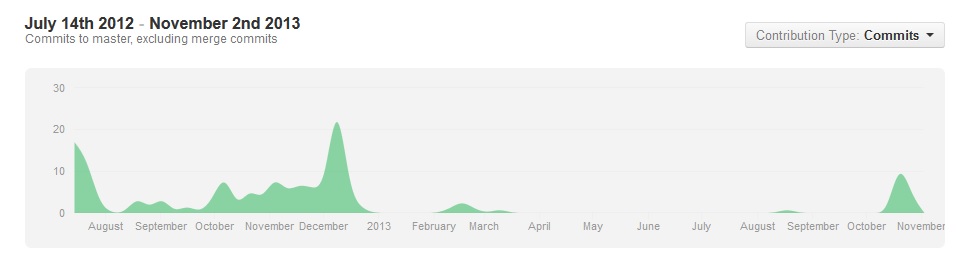
<p>Afterwards, I <a href="http://www.brianchu.com/about">joined</a> the MGWU team full-time as I took a full year off from school. I worked on the game here and there, bringing it up to 90%, before largely shelving the project for nearly a year until the past few weeks.</p>

<p><img class="img-thumbnail center" src="http://www.brianchu.com/images/blog/2013/dih-githistory.jpg" title="Git commit history" alt="Git commit history from August 2012 to November 2013"></p>

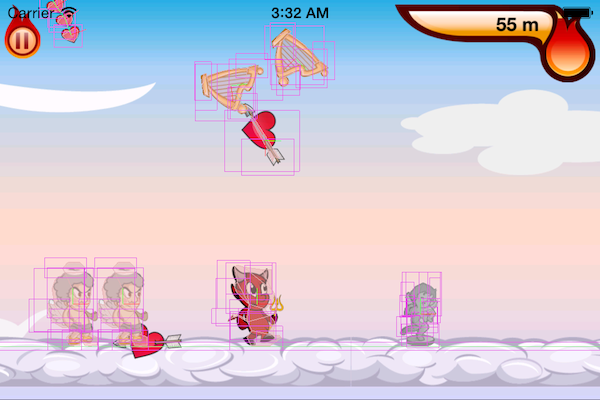
<p>There were a couple of difficult challenges. The game features ragdoll physics for the devil and angels, and setting up the parameters for the physical bodies was quite a lot of work. Dealing with physics in general was challenging at times: all the objects in the game are objects that can fully interact with the physical world, which meant dealing with unexpected behavior like being tipped over.</p>

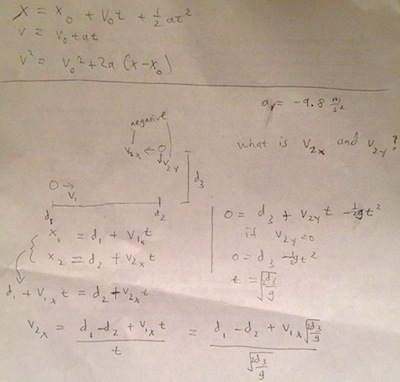
<p>One cool part: I got to use some of the physics I learned in school when I was calculating the velocity of the arrows in the game, using the kinematic equations of motion.</p>

<p><img class="img-thumbnail center" src="http://www.brianchu.com/images/blog/2013/dih-equations-small.jpg" title="Kinematic equations" alt="Handwritten calulations of the arrow"></p>

<p>The project was the first 10,000+ lines of code, object-oriented program I ever worked on, and it shows - the code is in dire need of serious refactoring, probably a month&rsquo;s worth of work. My first target? The entire class inheritance and object protocol (interface) system. The OOP structure that I originally created in the game over a year ago is convoluted, tightly coupled, and distinctly non-modular.</p>

<p>But it works! Hope you like it!</p>

<p><img class="img-thumbnail center" src="http://www.brianchu.com/images/blog/2013/dih-physics.png" title="Physics debugging" alt="Screenshot of game with physics debugging graphics."></p>

<p>By the way, I&rsquo;m looking for a summer internship! So <a href="#" data-toggle="modal" data-target=".contact-modal">contact me</a>!</p>
]]></content>
  </entry>


  <entry>
    <title type="html"><![CDATA[Creating an Auto-Growing Text Input]]></title>
    <link href="http://www.brianchu.com/blog/2013/11/02/creating-an-auto-growing-text-input/"/>
    <updated>2013-11-02T12:00:00-07:00</updated>
    <id>http://www.brianchu.com/blog/2013/11/02/creating-an-auto-growing-text-input</id>
    <content type="html"><![CDATA[<p>On two occasions I&rsquo;ve encountered the same problem: how do you create a textarea that automatically expands along with your input. Here&rsquo;s an implementation.</p>

<!-- more -->


<p>This was inspired by some bits and pieces on StackOverflow. The gist of it is that you place your textarea inside a wrapper div, set the textarea height to 100% so that it fills the parent, and then insert a div behind the textarea that maintains a copy of the textarea text. The browser will correctly size the hidden div, which will stretch the parent and stretch the textarea.</p>

<p>Here&rsquo;s a jsFiddle:</p>

<iframe width="100%" height="300" src="http://jsfiddle.net/2UDdh/43/embedded/" allowfullscreen="allowfullscreen" frameborder="0"></iframe>


<p>A copy of the code is below:</p>

<figure class='code'><figcaption><span>HTML</span></figcaption><div class="highlight"><table><tr><td class="gutter"><pre class="line-numbers"><span class='line-number'>1</span>
<span class='line-number'>2</span>
<span class='line-number'>3</span>
<span class='line-number'>4</span>
</pre></td><td class='code'><pre><code class='html'><span class='line'><span class="nt">&lt;div</span> <span class="na">class=</span><span class="s">&quot;textarea-container&quot;</span><span class="nt">&gt;</span>
</span><span class='line'>  <span class="nt">&lt;textarea&gt;&lt;/textarea&gt;</span>
</span><span class='line'>  <span class="nt">&lt;div</span> <span class="na">class=</span><span class="s">&quot;textarea-size&quot;</span><span class="nt">&gt;&lt;/div&gt;</span>
</span><span class='line'><span class="nt">&lt;/div&gt;</span>
</span></code></pre></td></tr></table></div></figure>


<figure class='code'><figcaption><span>CSS</span></figcaption><div class="highlight"><table><tr><td class="gutter"><pre class="line-numbers"><span class='line-number'>1</span>
<span class='line-number'>2</span>
<span class='line-number'>3</span>
<span class='line-number'>4</span>
<span class='line-number'>5</span>
<span class='line-number'>6</span>
<span class='line-number'>7</span>
<span class='line-number'>8</span>
<span class='line-number'>9</span>
<span class='line-number'>10</span>
<span class='line-number'>11</span>
<span class='line-number'>12</span>
<span class='line-number'>13</span>
<span class='line-number'>14</span>
<span class='line-number'>15</span>
<span class='line-number'>16</span>
<span class='line-number'>17</span>
<span class='line-number'>18</span>
<span class='line-number'>19</span>
<span class='line-number'>20</span>
<span class='line-number'>21</span>
<span class='line-number'>22</span>
<span class='line-number'>23</span>
<span class='line-number'>24</span>
<span class='line-number'>25</span>
<span class='line-number'>26</span>
<span class='line-number'>27</span>
<span class='line-number'>28</span>
<span class='line-number'>29</span>
<span class='line-number'>30</span>
<span class='line-number'>31</span>
<span class='line-number'>32</span>
<span class='line-number'>33</span>
<span class='line-number'>34</span>
<span class='line-number'>35</span>
<span class='line-number'>36</span>
<span class='line-number'>37</span>
<span class='line-number'>38</span>
<span class='line-number'>39</span>
<span class='line-number'>40</span>
<span class='line-number'>41</span>
<span class='line-number'>42</span>
<span class='line-number'>43</span>
<span class='line-number'>44</span>
<span class='line-number'>45</span>
<span class='line-number'>46</span>
<span class='line-number'>47</span>
<span class='line-number'>48</span>
<span class='line-number'>49</span>
<span class='line-number'>50</span>
<span class='line-number'>51</span>
<span class='line-number'>52</span>
<span class='line-number'>53</span>
</pre></td><td class='code'><pre><code class='css'><span class='line'><span class="nc">.textarea-container</span> <span class="p">{</span>
</span><span class='line'>  <span class="k">position</span><span class="o">:</span> <span class="k">relative</span><span class="p">;</span>
</span><span class='line'>  <span class="c">/* you should change this*/</span>
</span><span class='line'>  <span class="k">width</span><span class="o">:</span> <span class="m">50</span><span class="o">%</span><span class="p">;</span>
</span><span class='line'><span class="p">}</span>
</span><span class='line'>
</span><span class='line'><span class="nt">textarea</span><span class="o">,</span> <span class="nc">.textarea-size</span> <span class="p">{</span>
</span><span class='line'>  <span class="k">min-height</span><span class="o">:</span> <span class="m">25px</span><span class="p">;</span>
</span><span class='line'>  <span class="c">/* need to manually set font and font size */</span>
</span><span class='line'>  <span class="k">font-family</span><span class="o">:</span> <span class="k">sans-serif</span><span class="p">;</span>
</span><span class='line'>  <span class="k">font-size</span><span class="o">:</span> <span class="m">14px</span><span class="p">;</span>
</span><span class='line'>  <span class="n">box</span><span class="o">-</span><span class="n">sizing</span><span class="o">:</span> <span class="k">border</span><span class="o">-</span><span class="n">box</span><span class="p">;</span>
</span><span class='line'>  <span class="k">padding</span><span class="o">:</span> <span class="m">4px</span><span class="p">;</span>
</span><span class='line'>  <span class="k">border</span><span class="o">:</span> <span class="m">1px</span> <span class="k">solid</span><span class="p">;</span>
</span><span class='line'>
</span><span class='line'>  <span class="k">overflow</span><span class="o">:</span> <span class="k">hidden</span><span class="p">;</span>
</span><span class='line'>  <span class="k">width</span><span class="o">:</span> <span class="m">100</span><span class="o">%</span><span class="p">;</span>
</span><span class='line'><span class="p">}</span>
</span><span class='line'>
</span><span class='line'><span class="nt">textarea</span> <span class="p">{</span>
</span><span class='line'>  <span class="k">height</span><span class="o">:</span> <span class="m">100</span><span class="o">%</span><span class="p">;</span>
</span><span class='line'>  <span class="k">position</span><span class="o">:</span> <span class="k">absolute</span><span class="p">;</span>
</span><span class='line'>  <span class="n">resize</span><span class="o">:</span><span class="k">none</span><span class="p">;</span>
</span><span class='line'>
</span><span class='line'>  <span class="c">/*</span>
</span><span class='line'><span class="c">  &quot;pre&quot; or &quot;preline&quot; or &quot;normal&quot; fixes Chrome issue where</span>
</span><span class='line'><span class="c">    whitespace at end of lines does not trigger a line break.</span>
</span><span class='line'><span class="c">  However, it causes the text to exhibit the behavior seen with</span>
</span><span class='line'><span class="c">    &quot;pre&quot; that is described below.</span>
</span><span class='line'><span class="c">   */</span>
</span><span class='line'>  <span class="k">white-space</span><span class="o">:</span> <span class="k">normal</span><span class="p">;</span>
</span><span class='line'><span class="p">}</span>
</span><span class='line'>
</span><span class='line'><span class="nc">.textarea-size</span> <span class="p">{</span>
</span><span class='line'>  <span class="k">visibility</span><span class="o">:</span> <span class="k">hidden</span><span class="p">;</span>
</span><span class='line'>
</span><span class='line'>  <span class="c">/*</span>
</span><span class='line'><span class="c">  Pre-wrap: preserve spacing and newlines, but wrap text.</span>
</span><span class='line'><span class="c">  Pre: preserve spacing and newlines but don&#39;t wrap text.</span>
</span><span class='line'>
</span><span class='line'><span class="c">  &quot;pre&quot; does not wrap well on Firefox, even with word-wrap:break-word.</span>
</span><span class='line'><span class="c">  &quot;pre&quot; on Chrome works with word-wrap, but exhibits different behavior:</span>
</span><span class='line'><span class="c">  Instead of entire words being moved to the next line for wrapping,</span>
</span><span class='line'><span class="c">  the browser will cut words in the middle for wrapping.</span>
</span><span class='line'><span class="c">  &quot;pre-line&quot; has Firefox issues</span>
</span><span class='line'><span class="c">  */</span>
</span><span class='line'>  <span class="k">white-space</span><span class="o">:</span> <span class="n">pre</span><span class="o">-</span><span class="n">wrap</span><span class="p">;</span>
</span><span class='line'>  <span class="c">/* Required for wrapping lines in Webkit,</span>
</span><span class='line'><span class="c">    but not necessary in Firefox if you have white-space wrapping</span>
</span><span class='line'><span class="c">    (pre-wrap, normal, pre-line) already set */</span>
</span><span class='line'>  <span class="n">word</span><span class="o">-</span><span class="n">wrap</span><span class="o">:</span> <span class="n">break</span><span class="o">-</span><span class="n">word</span><span class="p">;</span>
</span><span class='line'>  <span class="k">overflow</span><span class="o">-</span><span class="n">wrap</span><span class="o">:</span> <span class="n">break</span><span class="o">-</span><span class="n">word</span><span class="p">;</span>
</span><span class='line'><span class="p">}</span>
</span></code></pre></td></tr></table></div></figure>


<figure class='code'><figcaption><span>JavaScript</span></figcaption><div class="highlight"><table><tr><td class="gutter"><pre class="line-numbers"><span class='line-number'>1</span>
<span class='line-number'>2</span>
<span class='line-number'>3</span>
<span class='line-number'>4</span>
<span class='line-number'>5</span>
<span class='line-number'>6</span>
<span class='line-number'>7</span>
<span class='line-number'>8</span>
<span class='line-number'>9</span>
<span class='line-number'>10</span>
<span class='line-number'>11</span>
<span class='line-number'>12</span>
<span class='line-number'>13</span>
<span class='line-number'>14</span>
</pre></td><td class='code'><pre><code class='javascript'><span class='line'><span class="kd">var</span> <span class="nx">textContainer</span><span class="p">,</span> <span class="nx">textareaSize</span><span class="p">,</span> <span class="nx">input</span><span class="p">;</span>
</span><span class='line'><span class="kd">var</span> <span class="nx">autoSize</span> <span class="o">=</span> <span class="kd">function</span> <span class="p">()</span> <span class="p">{</span>
</span><span class='line'>  <span class="c1">// also can use textContent or innerText</span>
</span><span class='line'>  <span class="nx">textareaSize</span><span class="p">.</span><span class="nx">innerHTML</span> <span class="o">=</span> <span class="nx">input</span><span class="p">.</span><span class="nx">value</span> <span class="o">+</span> <span class="s1">&#39;\n&#39;</span><span class="p">;</span>
</span><span class='line'><span class="p">};</span>
</span><span class='line'>
</span><span class='line'><span class="nb">document</span><span class="p">.</span><span class="nx">addEventListener</span><span class="p">(</span><span class="s1">&#39;DOMContentLoaded&#39;</span><span class="p">,</span> <span class="kd">function</span><span class="p">()</span> <span class="p">{</span>
</span><span class='line'>  <span class="nx">textContainer</span> <span class="o">=</span> <span class="nb">document</span><span class="p">.</span><span class="nx">querySelector</span><span class="p">(</span><span class="s1">&#39;.textarea-container&#39;</span><span class="p">);</span>
</span><span class='line'>  <span class="nx">textareaSize</span> <span class="o">=</span> <span class="nx">textContainer</span><span class="p">.</span><span class="nx">querySelector</span><span class="p">(</span><span class="s1">&#39;.textarea-size&#39;</span><span class="p">);</span>
</span><span class='line'>  <span class="nx">input</span> <span class="o">=</span> <span class="nx">textContainer</span><span class="p">.</span><span class="nx">querySelector</span><span class="p">(</span><span class="s1">&#39;textarea&#39;</span><span class="p">);</span>
</span><span class='line'>
</span><span class='line'>  <span class="nx">autoSize</span><span class="p">();</span>
</span><span class='line'>  <span class="nx">input</span><span class="p">.</span><span class="nx">addEventListener</span><span class="p">(</span><span class="s1">&#39;input&#39;</span><span class="p">,</span> <span class="nx">autoSize</span><span class="p">);</span>
</span><span class='line'><span class="p">});</span>
</span></code></pre></td></tr></table></div></figure>


]]></content>
  </entry>


  <entry>
    <title type="html"><![CDATA[Photo Embarrassment]]></title>
    <link href="http://www.brianchu.com/blog/2013/09/11/photo-embarrassment/"/>
    <updated>2013-09-11T10:00:00-07:00</updated>
    <id>http://www.brianchu.com/blog/2013/09/11/photo-embarrassment</id>
    <content type="html"><![CDATA[<p>Instagram and Snapchat seem to share a common theme: they try to solve the hurdle of photo embarrassment - they find ways to get around our self-restraint with sharing photos. <!-- more --> Instagram does this with filters so that users can create beautiful pictures of mundane scenes. Snapchat does this with ephemeral photos that disappear <a name="1-back" href="#1">[1]</a>.</p>

<p>This theme fits in with my observations of frequent users of Instagram and Snapchat. Instagram photos seems to lean towards the aspirational and idealized - an expression of a desired identity. I see my friends posting idealized pictures of food, activities, moments, scenery, and people. Filters get users to share photos of mundane moments when they would otherwise exercise self-restraint.</p>

<p>Snapchat seems to lean towards reality and the moment - a way of communicating your current status. I have friends that just post pictures of their faces (very specifically and almost exclusively their faces) throughout the day. Snapchat has in that sense become Twitter for photos: the disappearance of photos is not a gimmick but just a way to get users to take and share unflattering photos of themselves (the unflattering photo seems to be the hallmark of a Snapchat photo), when they would otherwise exercise self-restraint.</p>

<p><a name="1" href="#1-back">[1]</a> The fact that Snapchat does not have any technology that will actually ensure a photo&rsquo;s disappearance is largely irrelevant, for the same reason that it&rsquo;s irrelevant that Instagram does not guarantee your photos will actually look good.</p>
]]></content>
  </entry>


  <entry>
    <title type="html"><![CDATA[An Interesting Module Pattern: the Sealed Module]]></title>
    <link href="http://www.brianchu.com/blog/2013/08/18/an-interesting-module-pattern-the-sealed-module/"/>
    <updated>2013-08-18T06:00:00-07:00</updated>
    <id>http://www.brianchu.com/blog/2013/08/18/an-interesting-module-pattern-the-sealed-module</id>
    <content type="html"><![CDATA[<p>An interesting way to share private state across components of modules in JavaScript: <!-- more --><br/>
(credit goes to <a href="http://www.adequatelygood.com/JavaScript-Module-Pattern-In-Depth.html">this article</a>)</p>

<figure class='code'><figcaption><span></span></figcaption><div class="highlight"><table><tr><td class="gutter"><pre class="line-numbers"><span class='line-number'>1</span>
<span class='line-number'>2</span>
<span class='line-number'>3</span>
<span class='line-number'>4</span>
<span class='line-number'>5</span>
<span class='line-number'>6</span>
<span class='line-number'>7</span>
<span class='line-number'>8</span>
<span class='line-number'>9</span>
<span class='line-number'>10</span>
<span class='line-number'>11</span>
<span class='line-number'>12</span>
<span class='line-number'>13</span>
<span class='line-number'>14</span>
<span class='line-number'>15</span>
<span class='line-number'>16</span>
</pre></td><td class='code'><pre><code class='javascript'><span class='line'><span class="kd">var</span> <span class="nx">module</span> <span class="o">=</span> <span class="p">(</span><span class="kd">function</span> <span class="p">(</span><span class="nx">module</span><span class="p">)</span> <span class="p">{</span>
</span><span class='line'>  <span class="kd">var</span> <span class="nx">_private</span> <span class="o">=</span> <span class="nx">module</span><span class="p">.</span><span class="nx">_private</span> <span class="o">=</span> <span class="nx">module</span><span class="p">.</span><span class="nx">_private</span> <span class="o">||</span> <span class="p">{};</span>
</span><span class='line'>  <span class="kd">var</span> <span class="nx">_seal</span> <span class="o">=</span> <span class="nx">module</span><span class="p">.</span><span class="nx">_seal</span> <span class="o">=</span> <span class="nx">module</span><span class="p">.</span><span class="nx">_seal</span> <span class="o">||</span> <span class="kd">function</span> <span class="p">()</span> <span class="p">{</span>
</span><span class='line'>    <span class="k">delete</span> <span class="nx">module</span><span class="p">.</span><span class="nx">_private</span><span class="p">;</span>
</span><span class='line'>    <span class="k">delete</span> <span class="nx">module</span><span class="p">.</span><span class="nx">_seal</span><span class="p">;</span>
</span><span class='line'>    <span class="k">delete</span> <span class="nx">module</span><span class="p">.</span><span class="nx">_unseal</span><span class="p">;</span>
</span><span class='line'>  <span class="p">}</span>
</span><span class='line'>  <span class="kd">var</span> <span class="nx">_unseal</span> <span class="o">=</span> <span class="nx">module</span><span class="p">.</span><span class="nx">_unseal</span> <span class="o">=</span> <span class="nx">module</span><span class="p">.</span><span class="nx">_unseal</span> <span class="o">||</span> <span class="kd">function</span> <span class="p">()</span> <span class="p">{</span>
</span><span class='line'>    <span class="nx">module</span><span class="p">.</span><span class="nx">_private</span> <span class="o">=</span> <span class="nx">_private</span><span class="p">;</span>
</span><span class='line'>    <span class="nx">module</span><span class="p">.</span><span class="nx">_seal</span> <span class="o">=</span> <span class="nx">_seal</span><span class="p">;</span>
</span><span class='line'>    <span class="nx">module</span><span class="p">.</span><span class="nx">_unseal</span> <span class="o">=</span> <span class="nx">_unseal</span><span class="p">;</span>
</span><span class='line'>  <span class="p">};</span>
</span><span class='line'>  <span class="c1">// permanent access to _private, _seal, and _unseal</span>
</span><span class='line'>
</span><span class='line'>  <span class="k">return</span> <span class="nx">module</span><span class="p">;</span>
</span><span class='line'><span class="p">}(</span><span class="nx">module</span> <span class="o">||</span> <span class="p">{}));</span>
</span></code></pre></td></tr></table></div></figure>


<p><code>_unseal</code> must be called by a function (probably some sort of loader function) that was initialized before <code>_seal</code> was called (so that <code>_unseal</code> will be present in its closure scope).</p>

<p>For example:</p>

<figure class='code'><figcaption><span></span></figcaption><div class="highlight"><table><tr><td class="gutter"><pre class="line-numbers"><span class='line-number'>1</span>
<span class='line-number'>2</span>
<span class='line-number'>3</span>
<span class='line-number'>4</span>
<span class='line-number'>5</span>
<span class='line-number'>6</span>
<span class='line-number'>7</span>
<span class='line-number'>8</span>
<span class='line-number'>9</span>
<span class='line-number'>10</span>
<span class='line-number'>11</span>
<span class='line-number'>12</span>
<span class='line-number'>13</span>
<span class='line-number'>14</span>
<span class='line-number'>15</span>
<span class='line-number'>16</span>
<span class='line-number'>17</span>
<span class='line-number'>18</span>
<span class='line-number'>19</span>
<span class='line-number'>20</span>
<span class='line-number'>21</span>
<span class='line-number'>22</span>
</pre></td><td class='code'><pre><code class='javascript'><span class='line'><span class="kd">var</span> <span class="nx">loadScript</span> <span class="o">=</span> <span class="kd">function</span> <span class="p">(</span><span class="nx">scriptUrl</span><span class="p">)</span> <span class="p">{</span>
</span><span class='line'>  <span class="nx">module</span><span class="p">.</span><span class="nx">_unseal</span><span class="p">();</span>
</span><span class='line'>  <span class="kd">var</span> <span class="nx">script</span> <span class="o">=</span> <span class="nb">document</span><span class="p">.</span><span class="nx">createElement</span><span class="p">(</span><span class="s1">&#39;script&#39;</span><span class="p">);</span>
</span><span class='line'>  <span class="nx">script</span><span class="p">.</span><span class="nx">src</span> <span class="o">=</span> <span class="nx">scriptUrl</span><span class="p">;</span>
</span><span class='line'>
</span><span class='line'>  <span class="k">if</span> <span class="p">(</span><span class="nx">script</span><span class="p">.</span><span class="nx">readyState</span><span class="p">)</span> <span class="p">{</span>
</span><span class='line'>    <span class="nx">script</span><span class="p">.</span><span class="nx">onreadystatechange</span> <span class="o">=</span> <span class="kd">function</span> <span class="p">()</span> <span class="p">{</span>
</span><span class='line'>      <span class="k">if</span> <span class="p">(</span><span class="nx">script</span><span class="p">.</span><span class="nx">readyState</span> <span class="o">===</span> <span class="s2">&quot;loaded&quot;</span> <span class="o">||</span>
</span><span class='line'>          <span class="nx">script</span><span class="p">.</span><span class="nx">readyState</span> <span class="o">===</span> <span class="s2">&quot;complete&quot;</span><span class="p">)</span> <span class="p">{</span>
</span><span class='line'>        <span class="nx">script</span><span class="p">.</span><span class="nx">onreadystatechange</span> <span class="o">=</span> <span class="kc">null</span><span class="p">;</span>
</span><span class='line'>        <span class="nx">module</span><span class="p">.</span><span class="nx">_seal</span><span class="p">();</span>
</span><span class='line'>      <span class="p">}</span>
</span><span class='line'>    <span class="p">};</span>
</span><span class='line'>  <span class="p">}</span>
</span><span class='line'>  <span class="k">else</span> <span class="p">{</span>
</span><span class='line'>    <span class="nx">script</span><span class="p">.</span><span class="nx">onload</span> <span class="o">=</span> <span class="kd">function</span><span class="p">()</span> <span class="p">{</span>
</span><span class='line'>      <span class="nx">module</span><span class="p">.</span><span class="nx">_seal</span><span class="p">()</span>
</span><span class='line'>    <span class="p">};</span>
</span><span class='line'>  <span class="p">}</span>
</span><span class='line'>
</span><span class='line'>  <span class="nb">document</span><span class="p">.</span><span class="nx">getElementsByTagName</span><span class="p">(</span><span class="s1">&#39;head&#39;</span><span class="p">)[</span><span class="mi">0</span><span class="p">].</span><span class="nx">append</span><span class="p">(</span><span class="nx">script</span><span class="p">);</span>
</span><span class='line'><span class="p">};</span>
</span></code></pre></td></tr></table></div></figure>

]]></content>
  </entry>


  <entry>
    <title type="html"><![CDATA[A Little Note on Versions]]></title>
    <link href="http://www.brianchu.com/blog/2013/08/14/a-little-thing-with-versions/"/>
    <updated>2013-08-14T04:27:00-07:00</updated>
    <id>http://www.brianchu.com/blog/2013/08/14/a-little-thing-with-versions</id>
    <content type="html"><![CDATA[<p>tl;dr. Versions in bower and npm are <del>maddeningly inconsistent in a tiny way</del> now consistent.</p>

<!-- more -->


<p>So&hellip; In semver and bower (I&rsquo;m assuming bower since it relies on the node-semver module), a hypenated version suffix (postfix) decreases precedence &lt;(1.0.0 > 1.0.0-alpha > 1.0.0-1) and non-hypenated suffixes are invalid (1.0.0alpha is invalid).</p>

<p>Whereas in npm, <del>hypenation with a numeric suffix increases precedence (1.0.0-1 > 1.0.0) whereas anything that is not a hypenated number decreases precedence (1.0.0 > 1.0.0alpha). So 1.0.0-1 > 1.0.0-1-a > 1.0.0 > 1.0.0alpha.</del> versioning does in fact follow semver. Npm will automatically append a hypen if you leave it out (1.0.0alpha is 1.0.0-alpha). <del>The (outdated?) <a href="https://npmjs.org/doc/json.html#version">npm documentation</a> had led me to believe otherwise.</del> The docs have been updated!</p>
]]></content>
  </entry>


  <entry>
    <title type="html"><![CDATA[Grunt by Example - A Tutorial for JavaScript's Task Runner]]></title>
    <link href="http://www.brianchu.com/blog/2013/07/11/grunt-by-example-a-tutorial-for-javascripts-task-runner/"/>
    <updated>2013-07-11T16:35:00-07:00</updated>
    <id>http://www.brianchu.com/blog/2013/07/11/grunt-by-example-a-tutorial-for-javascripts-task-runner</id>
    <content type="html"><![CDATA[<p>What&rsquo;s Grunt used for? Automating front-end and JavaScript workflow tasks. Refreshing the browser when you change a script. Minifying and concatenating. Running tests. Think <code>rake</code> and <code>guard</code>, if you&rsquo;re coming from the Ruby world.</p>

<p>Enter Grunt by Example! A blow-by-blow tutorial. Just the way I like it. Let&rsquo;s dive in.</p>

<!-- more -->


<p>The catch - Grunt configuration files can be fairly convoluted at first glance, usually due to the fact that developers add more and more steps to their workflow over time.</p>

<p>Grunt is just a task runner. Every unit of functionality that you would want is usually achieved with a separate npm package (a grunt &ldquo;plugin&rdquo;).</p>

<p><code>npm search grunt</code> to view literally every grunt plugin available.</p>

<p>Get the command line interface: <code>npm install -g grunt-cli</code></p>

<p>Add the actual grunt task runner as a development dependency to your project (<code>--save-dev</code> adds the package as a dependency to <code>package.json</code>):
<code>npm install --save-dev grunt</code></p>

<p>Let&rsquo;s follow a process of gradual expansion.</p>

<p>Create an empty <code>Gruntfile.js</code> file in your project root. This will contain all of your task configuration.</p>

<p>Let&rsquo;s say that the first task we want to add to our workflow is to be able to concatenate several JavaScript files into one. Let&rsquo;s say those files are all in the <code>scripts/</code> sub-directory. We&rsquo;d want to do this before deploying a website, for example.</p>

<p>Run <code>npm install --save-dev grunt-contrib-concat</code>.</p>

<p>Let&rsquo;s look at our Gruntfile configured with just this one task.</p>

<p>A quick preview of the result before we look at the code. After setting up our configuration object, running <code>grunt concat</code>, <code>grunt concat:dist</code>, or <code>grunt build</code> in the shell in the project root will all do the same thing: concatenate all scripts in the <code>scripts</code> sub-directory into a single script called <code>main.js</code>.</p>

<figure class='code'><figcaption><span></span></figcaption><div class="highlight"><table><tr><td class="gutter"><pre class="line-numbers"><span class='line-number'>1</span>
<span class='line-number'>2</span>
<span class='line-number'>3</span>
<span class='line-number'>4</span>
<span class='line-number'>5</span>
<span class='line-number'>6</span>
<span class='line-number'>7</span>
<span class='line-number'>8</span>
<span class='line-number'>9</span>
<span class='line-number'>10</span>
<span class='line-number'>11</span>
<span class='line-number'>12</span>
<span class='line-number'>13</span>
<span class='line-number'>14</span>
<span class='line-number'>15</span>
<span class='line-number'>16</span>
<span class='line-number'>17</span>
<span class='line-number'>18</span>
<span class='line-number'>19</span>
<span class='line-number'>20</span>
<span class='line-number'>21</span>
<span class='line-number'>22</span>
<span class='line-number'>23</span>
<span class='line-number'>24</span>
<span class='line-number'>25</span>
<span class='line-number'>26</span>
<span class='line-number'>27</span>
<span class='line-number'>28</span>
<span class='line-number'>29</span>
<span class='line-number'>30</span>
<span class='line-number'>31</span>
<span class='line-number'>32</span>
<span class='line-number'>33</span>
<span class='line-number'>34</span>
<span class='line-number'>35</span>
<span class='line-number'>36</span>
<span class='line-number'>37</span>
<span class='line-number'>38</span>
<span class='line-number'>39</span>
<span class='line-number'>40</span>
<span class='line-number'>41</span>
<span class='line-number'>42</span>
<span class='line-number'>43</span>
</pre></td><td class='code'><pre><code class='javascript'><span class='line'><span class="c1">//Grunt is just JavaScript running in node, after all...</span>
</span><span class='line'><span class="nx">module</span><span class="p">.</span><span class="nx">exports</span> <span class="o">=</span> <span class="kd">function</span><span class="p">(</span><span class="nx">grunt</span><span class="p">)</span> <span class="p">{</span>
</span><span class='line'>
</span><span class='line'>  <span class="c1">// All upfront config goes in a massive nested object.</span>
</span><span class='line'>  <span class="nx">grunt</span><span class="p">.</span><span class="nx">initConfig</span><span class="p">({</span>
</span><span class='line'>    <span class="c1">// You can set arbitrary key-value pairs.</span>
</span><span class='line'>    <span class="nx">distFolder</span><span class="o">:</span> <span class="s1">&#39;dist&#39;</span><span class="p">,</span>
</span><span class='line'>    <span class="c1">// You can also set the value of a key as parsed JSON.</span>
</span><span class='line'>    <span class="c1">// Allows us to reference properties we declared in package.json.</span>
</span><span class='line'>    <span class="nx">pkg</span><span class="o">:</span> <span class="nx">grunt</span><span class="p">.</span><span class="nx">file</span><span class="p">.</span><span class="nx">readJSON</span><span class="p">(</span><span class="s1">&#39;package.json&#39;</span><span class="p">),</span>
</span><span class='line'>    <span class="c1">// Grunt tasks are associated with specific properties.</span>
</span><span class='line'>    <span class="c1">// these names generally match their npm package name.</span>
</span><span class='line'>    <span class="nx">concat</span><span class="o">:</span> <span class="p">{</span>
</span><span class='line'>      <span class="c1">// Specify some options, usually specific to each plugin.</span>
</span><span class='line'>      <span class="nx">options</span><span class="o">:</span> <span class="p">{</span>
</span><span class='line'>        <span class="c1">// Specifies string to be inserted between concatenated files.</span>
</span><span class='line'>        <span class="nx">separator</span><span class="o">:</span> <span class="s1">&#39;;&#39;</span>
</span><span class='line'>      <span class="p">},</span>
</span><span class='line'>      <span class="c1">// &#39;dist&#39; is what is called a &quot;target.&quot;</span>
</span><span class='line'>      <span class="c1">// It&#39;s a way of specifying different sub-tasks or modes.</span>
</span><span class='line'>      <span class="nx">dist</span><span class="o">:</span> <span class="p">{</span>
</span><span class='line'>        <span class="c1">// The files to concatenate:</span>
</span><span class='line'>        <span class="c1">// Notice the wildcard, which is automatically expanded.</span>
</span><span class='line'>        <span class="nx">src</span><span class="o">:</span> <span class="p">[</span><span class="s1">&#39;scripts/*.js&#39;</span><span class="p">],</span>
</span><span class='line'>        <span class="c1">// The destination file:</span>
</span><span class='line'>        <span class="c1">// Notice the angle-bracketed ERB-like templating,</span>
</span><span class='line'>        <span class="c1">// which allows you to reference other properties.</span>
</span><span class='line'>        <span class="c1">// This is equivalent to &#39;dist/main.js&#39;.</span>
</span><span class='line'>        <span class="nx">dest</span><span class="o">:</span> <span class="s1">&#39;&lt;%= distFolder %&gt;/main.js&#39;</span>
</span><span class='line'>        <span class="c1">// You can reference any grunt config property you want.</span>
</span><span class='line'>        <span class="c1">// Ex: &#39;&lt;%= concat.options.separator %&gt;&#39; instead of &#39;;&#39;</span>
</span><span class='line'>      <span class="p">}</span>
</span><span class='line'>    <span class="p">}</span>
</span><span class='line'>  <span class="p">});</span> <span class="c1">// The end of grunt.initConfig</span>
</span><span class='line'>
</span><span class='line'>  <span class="c1">// We&#39;ve set up each task&#39;s configuration.</span>
</span><span class='line'>  <span class="c1">// Now actually load the tasks.</span>
</span><span class='line'>  <span class="c1">// This will do a lookup similar to node&#39;s require() function.</span>
</span><span class='line'>  <span class="nx">grunt</span><span class="p">.</span><span class="nx">loadNpmTasks</span><span class="p">(</span><span class="s1">&#39;grunt-contrib-concat&#39;</span><span class="p">);</span>
</span><span class='line'>
</span><span class='line'>  <span class="c1">// Register our own custom task alias.</span>
</span><span class='line'>  <span class="nx">grunt</span><span class="p">.</span><span class="nx">registerTask</span><span class="p">(</span><span class="s1">&#39;build&#39;</span><span class="p">,</span> <span class="p">[</span><span class="s1">&#39;concat&#39;</span><span class="p">]);</span>
</span><span class='line'><span class="p">};</span>
</span></code></pre></td></tr></table></div></figure>


<p>You might still be confused about the notion of a &ldquo;target.&rdquo; More on that:</p>

<p>Let&rsquo;s say there&rsquo;s another set of files you want to concatenate. All script files in <code>deploy/</code> should be concatenated into <code>deploy.js</code> (in the project root). Let&rsquo;s say we want that task to look like <code>grunt concat:deploy</code></p>

<p>To achieve that, our concat task now looks like:</p>

<figure class='code'><figcaption><span></span></figcaption><div class="highlight"><table><tr><td class="gutter"><pre class="line-numbers"><span class='line-number'>1</span>
<span class='line-number'>2</span>
<span class='line-number'>3</span>
<span class='line-number'>4</span>
<span class='line-number'>5</span>
<span class='line-number'>6</span>
<span class='line-number'>7</span>
<span class='line-number'>8</span>
<span class='line-number'>9</span>
<span class='line-number'>10</span>
<span class='line-number'>11</span>
<span class='line-number'>12</span>
<span class='line-number'>13</span>
<span class='line-number'>14</span>
<span class='line-number'>15</span>
<span class='line-number'>16</span>
<span class='line-number'>17</span>
<span class='line-number'>18</span>
</pre></td><td class='code'><pre><code class='javascript'><span class='line'><span class="nx">concat</span><span class="o">:</span> <span class="p">{</span>
</span><span class='line'>  <span class="nx">options</span><span class="o">:</span> <span class="p">{</span>
</span><span class='line'>    <span class="nx">separator</span><span class="o">:</span> <span class="s1">&#39;;&#39;</span>
</span><span class='line'>  <span class="p">},</span>
</span><span class='line'>  <span class="nx">dist</span><span class="o">:</span> <span class="p">{</span>
</span><span class='line'>    <span class="nx">src</span><span class="o">:</span> <span class="p">[</span><span class="s1">&#39;scripts/*.js&#39;</span><span class="p">],</span>
</span><span class='line'>    <span class="nx">dest</span><span class="o">:</span> <span class="s1">&#39;&lt;%= distFolder %&gt;/main.js&#39;</span>
</span><span class='line'>  <span class="p">},</span>
</span><span class='line'>  <span class="nx">deploy</span><span class="o">:</span> <span class="p">{</span>
</span><span class='line'>    <span class="c1">// options that are specific to the &#39;deploy&#39; target</span>
</span><span class='line'>    <span class="c1">// target-level options override task-level options</span>
</span><span class='line'>    <span class="nx">options</span><span class="o">:</span> <span class="p">{</span>
</span><span class='line'>      <span class="c1">// separator:&#39;;;;&#39; would override the parent setting</span>
</span><span class='line'>    <span class="p">},</span>
</span><span class='line'>    <span class="nx">src</span><span class="o">:</span><span class="p">[</span><span class="s1">&#39;deploy/*.js&#39;</span><span class="p">],</span>
</span><span class='line'>    <span class="nx">dest</span><span class="o">:</span><span class="s1">&#39;deploy.js&#39;</span>
</span><span class='line'>  <span class="p">}</span>
</span><span class='line'><span class="p">}</span>
</span></code></pre></td></tr></table></div></figure>


<p>If you run <code>grunt concat:dist,</code> all scripts in <code>scripts/</code> will be concatenated into  <code>dist/main.js</code>. <code>grunt concat:dist</code> runs the concat task with the config settings that are specified under <code>dist</code>. <code>grunt concat:deploy</code> runs the concat task with the config settings specified under <code>deploy</code>. <code>grunt concat</code> will run concat with <em>both</em> targets, separately. The parent-level <code>options</code> setting specifies config settings that are shared by both targets. <code>grunt build</code> is an alias for <code>grunt concat</code>.</p>

<p>Now let&rsquo;s tackle a common, yet relatively complicated task.</p>

<p>Let&rsquo;s get Grunt to run certain tasks in response to changes in files. An extremely powerful and common use-case: reloading a static website when you change its HTML/CSS/JS. It&rsquo;s fairly complicated and it&rsquo;s usually something you just copy-and-paste. Here are the steps to setting this up using the <code>watch</code> and <code>connect</code> plugins, along with the <code>connect-livereload</code> (a piece of Connect middleware that is not grunt-specific). For this example, let&rsquo;s assume that your static website is located in the <code>client/</code> folder.</p>

<p>Install the three plugins:<br/>
<code>npm install --save-dev grunt-contrib-watch grunt-contrib-connect connect-livereload</code></p>

<p>Add this basic initialization code to the top of your Gruntfile:</p>

<figure class='code'><figcaption><span></span></figcaption><div class="highlight"><table><tr><td class="gutter"><pre class="line-numbers"><span class='line-number'>1</span>
<span class='line-number'>2</span>
<span class='line-number'>3</span>
<span class='line-number'>4</span>
<span class='line-number'>5</span>
<span class='line-number'>6</span>
<span class='line-number'>7</span>
<span class='line-number'>8</span>
<span class='line-number'>9</span>
<span class='line-number'>10</span>
<span class='line-number'>11</span>
<span class='line-number'>12</span>
<span class='line-number'>13</span>
<span class='line-number'>14</span>
<span class='line-number'>15</span>
<span class='line-number'>16</span>
<span class='line-number'>17</span>
<span class='line-number'>18</span>
</pre></td><td class='code'><pre><code class='javascript'><span class='line'><span class="c1">// This is the default port that livereload listens on;</span>
</span><span class='line'><span class="c1">// change it if you configure livereload to use another port.</span>
</span><span class='line'><span class="kd">var</span> <span class="nx">LIVERELOAD_PORT</span> <span class="o">=</span> <span class="mi">35729</span><span class="p">;</span>
</span><span class='line'><span class="c1">// lrSnippet is just a function.</span>
</span><span class='line'><span class="c1">// It&#39;s a piece of Connect middleware that injects</span>
</span><span class='line'><span class="c1">// a script into the static served html.</span>
</span><span class='line'><span class="kd">var</span> <span class="nx">lrSnippet</span> <span class="o">=</span> <span class="nx">require</span><span class="p">(</span><span class="s1">&#39;connect-livereload&#39;</span><span class="p">)({</span> <span class="nx">port</span><span class="o">:</span> <span class="nx">LIVERELOAD_PORT</span> <span class="p">});</span>
</span><span class='line'><span class="c1">// All the middleware necessary to serve static files.</span>
</span><span class='line'><span class="kd">var</span> <span class="nx">livereloadMiddleware</span> <span class="o">=</span> <span class="kd">function</span> <span class="p">(</span><span class="nx">connect</span><span class="p">,</span> <span class="nx">options</span><span class="p">)</span> <span class="p">{</span>
</span><span class='line'>  <span class="k">return</span> <span class="p">[</span>
</span><span class='line'>    <span class="c1">// Inject a livereloading script into static files.</span>
</span><span class='line'>    <span class="nx">lrSnippet</span><span class="p">,</span>
</span><span class='line'>    <span class="c1">// Serve static files.</span>
</span><span class='line'>    <span class="nx">connect</span><span class="p">.</span><span class="kr">static</span><span class="p">(</span><span class="nx">options</span><span class="p">.</span><span class="nx">base</span><span class="p">),</span>
</span><span class='line'>    <span class="c1">// Make empty directories browsable.</span>
</span><span class='line'>    <span class="nx">connect</span><span class="p">.</span><span class="nx">directory</span><span class="p">(</span><span class="nx">options</span><span class="p">.</span><span class="nx">base</span><span class="p">)</span>
</span><span class='line'>  <span class="p">];</span>
</span><span class='line'><span class="p">};</span>
</span></code></pre></td></tr></table></div></figure>


<p>Add to your grunt.initConfig object the following two tasks configurations:</p>

<figure class='code'><figcaption><span></span></figcaption><div class="highlight"><table><tr><td class="gutter"><pre class="line-numbers"><span class='line-number'>1</span>
<span class='line-number'>2</span>
<span class='line-number'>3</span>
<span class='line-number'>4</span>
<span class='line-number'>5</span>
<span class='line-number'>6</span>
<span class='line-number'>7</span>
<span class='line-number'>8</span>
<span class='line-number'>9</span>
<span class='line-number'>10</span>
<span class='line-number'>11</span>
<span class='line-number'>12</span>
<span class='line-number'>13</span>
<span class='line-number'>14</span>
<span class='line-number'>15</span>
<span class='line-number'>16</span>
<span class='line-number'>17</span>
<span class='line-number'>18</span>
<span class='line-number'>19</span>
<span class='line-number'>20</span>
<span class='line-number'>21</span>
<span class='line-number'>22</span>
<span class='line-number'>23</span>
<span class='line-number'>24</span>
<span class='line-number'>25</span>
<span class='line-number'>26</span>
<span class='line-number'>27</span>
<span class='line-number'>28</span>
<span class='line-number'>29</span>
<span class='line-number'>30</span>
</pre></td><td class='code'><pre><code class='javascript'><span class='line'><span class="c1">// The connect task is used to serve static files with a local server.</span>
</span><span class='line'><span class="nx">connect</span><span class="o">:</span> <span class="p">{</span>
</span><span class='line'>  <span class="nx">client</span><span class="o">:</span> <span class="p">{</span>
</span><span class='line'>    <span class="nx">options</span><span class="o">:</span> <span class="p">{</span>
</span><span class='line'>      <span class="c1">// The server&#39;s port, and the folder to serve from:</span>
</span><span class='line'>      <span class="c1">// Ex: &#39;localhost:9000&#39; would serve up &#39;client/index.html&#39;</span>
</span><span class='line'>      <span class="nx">port</span><span class="o">:</span> <span class="mi">9000</span><span class="p">,</span>
</span><span class='line'>      <span class="nx">base</span><span class="o">:</span><span class="s1">&#39;client&#39;</span>
</span><span class='line'>      <span class="c1">// Custom middleware for the HTTP server:</span>
</span><span class='line'>      <span class="c1">// The injected JavaScript reloads the page.</span>
</span><span class='line'>      <span class="nx">middleware</span><span class="o">:</span> <span class="nx">livereloadMiddleware</span>
</span><span class='line'>    <span class="p">}</span>
</span><span class='line'>  <span class="p">}</span>
</span><span class='line'><span class="p">}</span>
</span><span class='line'><span class="c1">// The watch task is used to run tasks in response to file changes</span>
</span><span class='line'><span class="nx">watch</span><span class="o">:</span> <span class="p">{</span>
</span><span class='line'>  <span class="nx">client</span><span class="o">:</span> <span class="p">{</span>
</span><span class='line'>    <span class="c1">// &#39;**&#39; is used to include all subdirectories</span>
</span><span class='line'>    <span class="c1">// and subdirectories of subdirectories, and so on, recursively.</span>
</span><span class='line'>    <span class="nx">files</span><span class="o">:</span> <span class="p">[</span><span class="s1">&#39;client/**/*&#39;</span><span class="p">],</span>
</span><span class='line'>    <span class="c1">// In our case, we don&#39;t configure any additional tasks,</span>
</span><span class='line'>    <span class="c1">// since livereload is built into the watch task,</span>
</span><span class='line'>    <span class="c1">// and since the browser refresh is handled by the snippet.</span>
</span><span class='line'>    <span class="c1">// Any other tasks to run (e.g. compile CoffeeScript) go here:</span>
</span><span class='line'>    <span class="nx">tasks</span><span class="o">:</span><span class="p">[],</span>
</span><span class='line'>    <span class="nx">options</span><span class="o">:</span> <span class="p">{</span>
</span><span class='line'>      <span class="nx">livereload</span><span class="o">:</span><span class="nx">LIVERELOAD_PORT</span>
</span><span class='line'>    <span class="p">}</span>
</span><span class='line'>  <span class="p">}</span>
</span><span class='line'><span class="p">}</span>
</span></code></pre></td></tr></table></div></figure>


<p>Finally, we need to run the <code>connect</code> and <code>watch</code> tasks in sequence. To save ourselves from having to type in two shell commands, we can register a task alias:</p>

<figure class='code'><figcaption><span></span></figcaption><div class="highlight"><table><tr><td class="gutter"><pre class="line-numbers"><span class='line-number'>1</span>
</pre></td><td class='code'><pre><code class='javascript'><span class='line'><span class="nx">grunt</span><span class="p">.</span><span class="nx">registerTask</span><span class="p">(</span><span class="s1">&#39;preview&#39;</span><span class="p">,</span> <span class="p">[</span><span class="s1">&#39;connect:client&#39;</span><span class="p">,</span><span class="s1">&#39;watch:client&#39;</span><span class="p">]);</span>
</span></code></pre></td></tr></table></div></figure>


<p>Running <code>grunt preview</code> will now run both tasks.</p>

<p>Some more grunt plugins to be aware about (<code>contrib</code> plugins are officially maintained):</p>

<ul>
<li><code>grunt-contrib-uglify</code> for minifying your JS files. It works similarly to <code>grunt-contrib-concat</code>.</li>
<li><code>grunt-contrib-jshint</code> for running JSHint.</li>
<li><code>grunt contrib-coffee</code> for compiling CoffeeScript.</li>
<li><code>grunt-contrib-sass</code> for compiling SASS.</li>
<li><code>grunt-concurrent</code> for running tasks concurrently (instead of sequentially) - useful if you want to run multiple watch tasks concurrently.

<ul>
<li>If you have a series of tasks, the <code>watch</code> task must be run last. <code>watch</code> is a task that never ends until you terminate it. Thus, Grunt won&rsquo;t ever reach tasks that come after <code>watch</code>.</li>
</ul>
</li>
<li><code>grunt-nodemon</code> for running <a href="https://github.com/remy/nodemon">nodemon</a> with your node app. This runs your node app and reloads it when files change.</li>
<li><code>grunt-simplemocha</code> for running mocha tests.</li>
<li><code>grunt-open</code> for opening files and URLs.</li>
</ul>


<p>Some tips:</p>

<ol>
<li>If your Gruntfile starts getting too unwieldy, you can break it up by using <code>grunt.file.readJSON()</code>.</li>
<li>Tired of copying and pasting <code>loadNpmTasks</code>?  Try this:

<ul>
<li><code>npm install --save-dev matchdep</code></li>
<li>use <code>require('matchdep').filterDev('grunt-*').forEach(grunt.loadNpmTasks);</code> where you would otherwise list out all your multiple <code>grunt.loadNpmTask</code> calls.</li>
</ul>
</li>
</ol>


<p>For more advanced concepts, <a href="http://gruntjs.com/getting-started">read the Grunt docs!</a> They&rsquo;re pretty good.</p>
]]></content>
  </entry>
  
  
</feed>